A rank tracker for the changes that matter.
Follow Google keyword positions over time and decide which changes deserve your attention.
A daily rank tracker turns isolated checks into history
A single search result tells you where a page appeared at one moment. A rank tracker adds the context: whether the position is stable, improving, or repeatedly moving. SerpToday saves keyword observations inside a project with a fixed country, language and device.
Use daily tracking to monitor a focused group of searches, compare ranking URLs and revisit changes after editing a page. History begins when tracking starts; it does not reconstruct rankings from before your project existed.
Set up a consistent keyword tracking project
Pick the domain or specific page, then select the search market, language and device. Keep those conditions consistent. If you need a separate device or country view, use a separate project within your plan allowance.
Start with a balanced keyword set: terms that already bring relevant visits, important topics with room to grow, and a few new opportunities. Keep the list stable enough to compare periods. Replacing the entire list makes the previous average a poor baseline.
Read a trend, not just a green arrow
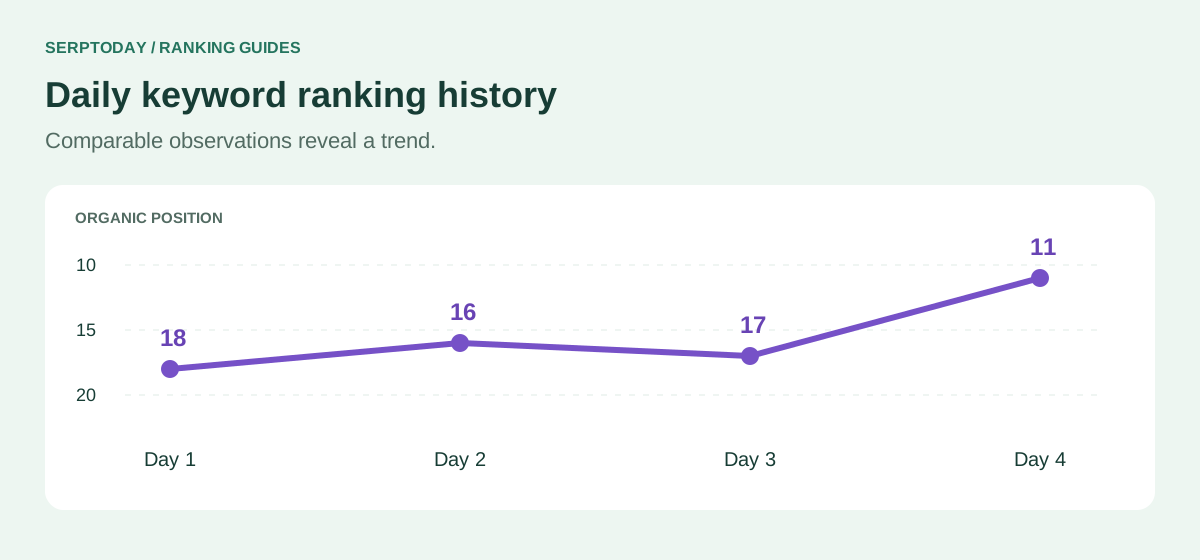
A lower organic position number is better: moving from 18 to 11 is an improvement of seven positions. A return from 11 to 14 is a drop of three. The size of the change matters less than whether the query is useful and the trend persists.
Suppose a keyword moves through positions 18, 16, 17 and 11 across four saved observations. The overall direction improved, but the middle movement shows why one daily drop should not trigger an immediate rewrite. Inspect the chart and ranking URL together.
Build a weekly SEO tracking routine
Begin with important keywords that changed. Open their saved history and check whether the ranking page also changed. Review the results around those pages, then choose one action you can explain: clarify an answer, fix a technical problem or strengthen a relevant internal link.
Record the date and purpose of an edit in your own change log. Compare later checks under the same conditions. If several unrelated pages move together, investigate a broader cause before editing every page separately.
Daily checks and manual rechecks serve different purposes
Eligible active keywords receive automatic daily checks. A manual recheck is an extra request against the allowance shown in your account, useful after a specific change or when an observation needs review. Refreshing repeatedly does not improve your Google ranking.
Check the observation time before interpreting a position as current. A stored result is not a continuous live feed. If a check is still running or data is unavailable, wait for a completed observation rather than treating missing data as a position of zero.
Connect tracking with useful actions
Use the keyword table to find your priority, the saved search results to understand competing pages, and Improve Rankings to review available page evidence. Quick Wins can help you identify opportunities for further investigation; it does not guarantee an improvement.
Keep ranking performance separate from business results. More top positions are useful only if the searches fit your offer. Check relevant traffic and conversions alongside the ranking trend, and review the current pricing page before expanding your tracking capacity.
Tracking, usage and account questions
How often does the rank tracker update?
Eligible active keywords receive daily automatic checks. Check the saved observation time in your workspace; manual rechecks use your available allowance.
Can I track desktop and mobile?
Yes. Each project uses one device. Keep separate project histories when comparing desktop and mobile results.
Does daily tracking guarantee higher rankings?
No. Tracking measures changes. Content quality, technical accessibility, competition and other search factors influence ranking.
Start with 10 keywords, free forever.
Create an account, choose your search market and start building a useful ranking history. No credit card required.
Create account